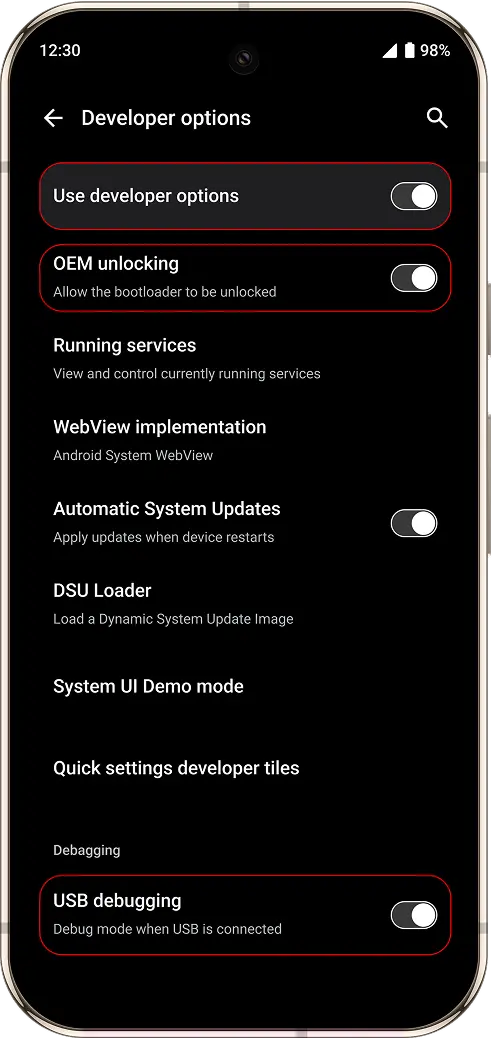
Enable Developer Mode & OEM Unlocking & USB Debugging
If you are turning on the phone for the first time and OEM unlocking is unavailable or greyed out, make sure the phone is connected to the internet (Wi-Fi or mobile data) and wait a few minutes.
Step-by-Step Instructions:
Step 1: Enable Developer Mode
- Open your phone's Settings app.
- Scroll down and tap About phone.
- Find Build number.
- Tap Build number 7 times quickly.
- Enter your device PIN or password if prompted.
- You'll see a message: "You are now a developer!"
Step 2: Enable OEM Unlocking
- Go back to Settings.
- Tap System > Developer options (this menu appears after enabling Developer Mode).
- Scroll down and toggle ON OEM Unlocking.
- Confirm the warning and enter your PIN if required.
Step 3: Enable USB Debugging
1. While still in Developer options, find USB Debugging.
2. Toggle it ON.