Step 1:
Setup Requirement
Step 2:
Step 3:
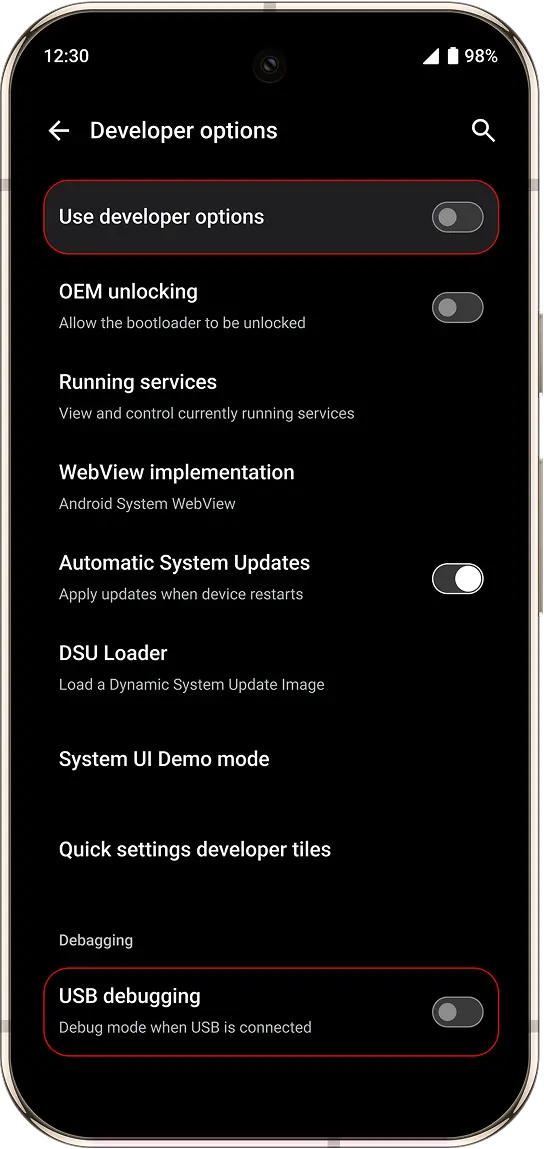
Before proceeding, make sure the following is enabled on your phone:
- Boot into Castrum OS
- Go to: Settings → About phone
- Scroll to the bottom
- Tap Build number 7 times to enable Developer Options
- Go to: Settings → System → Developer options
- Enable USB debugging
This process may take a few minutes. Do not disconnect the device.
- Connect your phone to the computer via USB
- ⚠️ A confirmation pop-up will appear on your phone — you must tap “Allow” to proceed
- (Optional) Enable “Always allow from this computer” to avoid repeated prompts